Calling · 4 min
How Chumley decides a call actually happened
Tap Call on a card and, if the call happens, it logs itself with the time on it. No form afterwards. What is worth understanding is how it knows, because it explains everything it does that looks odd.
14 days free. No card to start.
It cannot see your phone
Start here, because everything else follows from it. Chumley is a web page. It hands a number to your device and asks your device to call it. After that it is blind. It cannot hear a ringtone, it does not know if you connected, and nobody tells it when you hang up.
What it can see is that something took over your screen, and how long you were gone. That is the entire signal it has to work with, and the whole design is about being honest with a signal that thin.
How it decides
Two things have to be true. Something has to take the screen quickly after you tapped, within about six seconds, because a dialer opens straight away and anything later than that is you doing something else. Then you have to be gone long enough for a conversation to have happened.
That threshold is twelve seconds. Under twelve seconds, nobody said hello, heard an answer and said anything after it. Over twelve, a call plausibly took place, so it logs one against that lead with the time and how long you were away.
When it is not sure, it asks
If you tapped Call, something opened, and you were back in four seconds, Chumley does not know what happened and it will not pretend to. Maybe you misdialled. Maybe they were engaged. Maybe you changed your mind.
So it asks. One tap to say whether it happened, and you move on. This is the part people occasionally find fussy, and it is deliberate. A missed log costs you one tap. A call on a customer's record that never happened costs you the ability to trust any of it, and you will not find out it is wrong until you are reading that timeline back in three months trying to remember where you got to.
When nothing answers at all
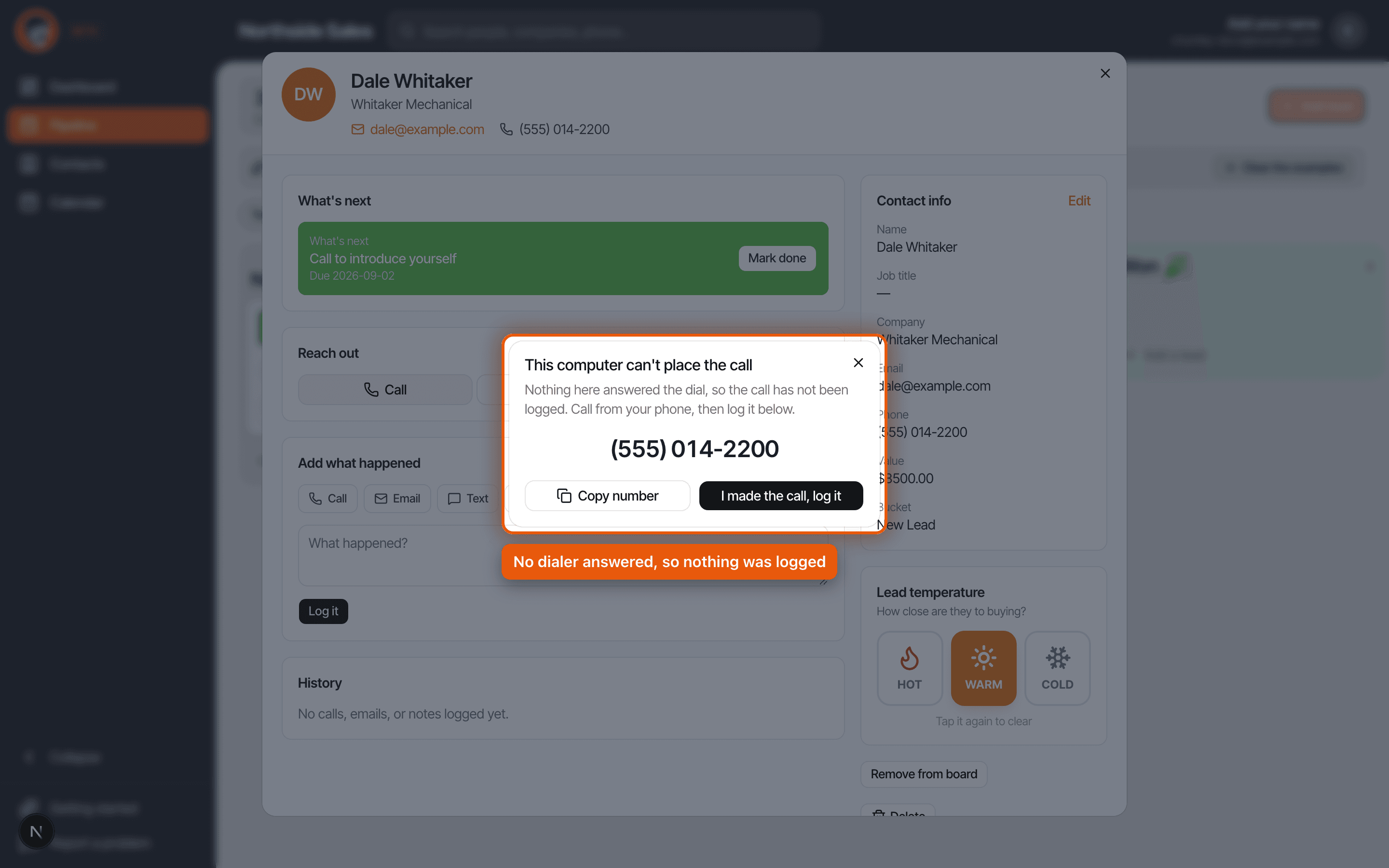
On a computer with no dialer, tapping Call would do nothing visible, which reads as a broken button. So after about half a second of silence, Chumley stops waiting and shows you the number instead, in large type, with a button to copy it and a button that says I made the call, log it.
Nothing is logged in that situation unless you say so, because nothing happened as far as we can tell. You dial it however you actually dial things, then tap the button, and the record is the same as if it had all worked.
If your browser asked permission to open an external app and you said no, Chumley remembers that for the rest of your session and stops making you wait for a handoff that is never coming. Reload the page after you fix the permission and it will try properly again.
Logging one yourself, and saying how it went
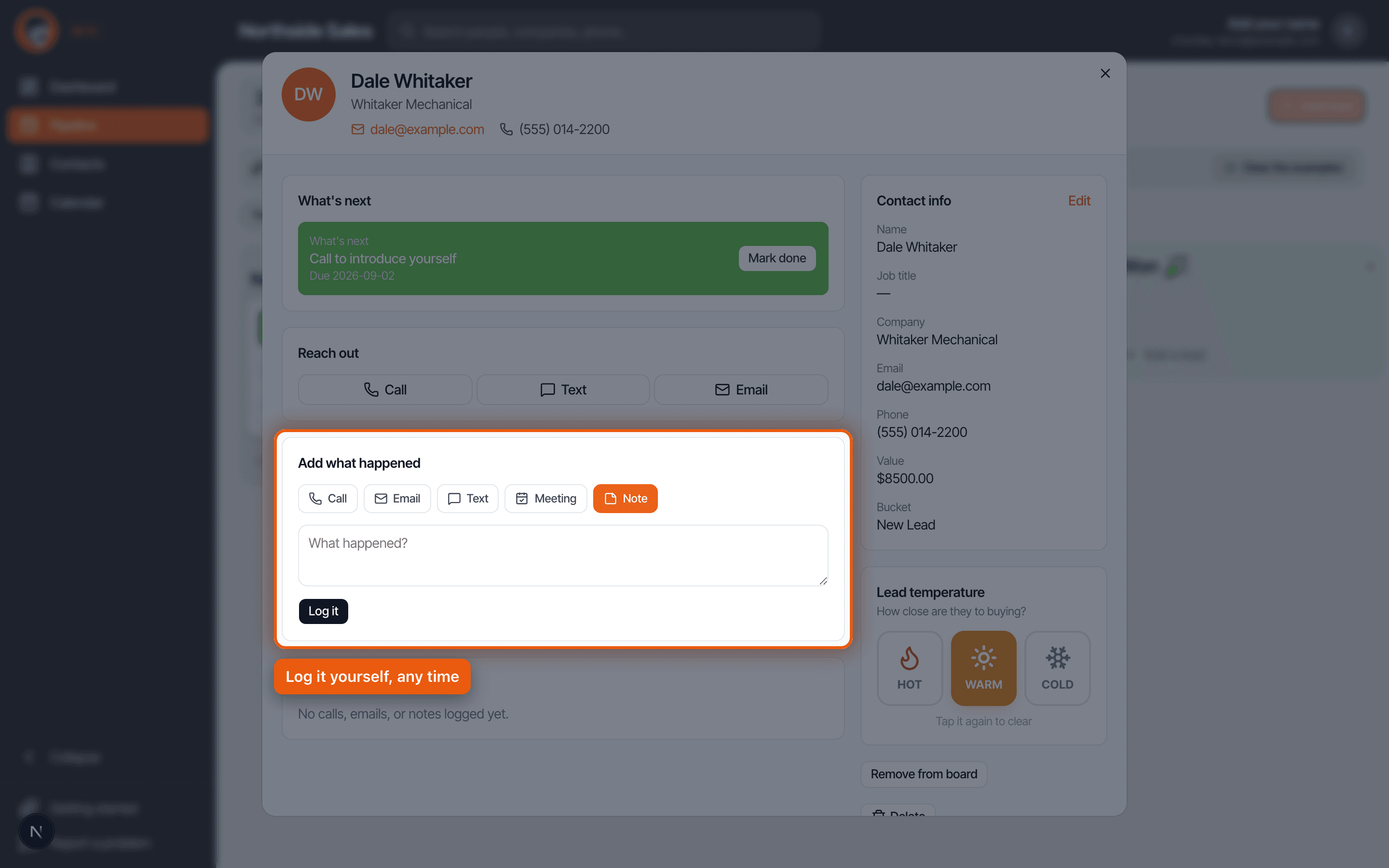
Open any lead and there is a section called Add what happened, with buttons for call, email, text, meeting and note. That path is always there and never depends on any of the above working.
After a call, automatic or manual, you can say how it went: connected, left voicemail, or bad number. There is a one line box next to it if you want one. Left voicemail, call back Tuesday. That is the right amount to write.
You are not filing a report. You are leaving yourself a note for the version of you who opens this card in three weeks having forgotten the entire conversation.
Why nothing is written until it knows
Worth one paragraph because it used to be wrong. The obvious way to build this is to write the call down the moment you leave, then delete it if you come straight back. That works until your phone kills the page while it is in the background, which Android does routinely under memory pressure. The write happened, the delete never ran, and a call that was never made sat on that lead forever.
Nothing is written now until the outcome is known. It also measures with the actual clock rather than a timer, because a backgrounded tab has its timers frozen, which is exactly the window it needs to measure.
The one that catches people out
Chumley only knows about calls that started with a tap in Chumley. That is the whole rule and it surprises people.
Call somebody straight from your phone's own contacts, ring them back from your recent calls list, pick up when they ring you, or dial from a desk phone, and Chumley sees none of it. There is no phone bill it reads and no carrier it talks to. As far as the record is concerned, that call did not happen.
This matters most for calls back. Somebody rings you, you have a great conversation, and nothing about it lands on their card. So get in the habit: after a call you did not start from the app, open the lead and hit Call under Add what happened. It takes five seconds and it is the difference between a timeline you can trust and one with holes in it exactly where the important conversations were.
Tap Call and it handles itself. Twelve seconds away or more counts as a call, less than that and it asks, and if nothing answers at all it shows you the number so you are never stuck. Anything you dial elsewhere, log by hand.
Read it as a script · Still stuck? Ask us and we will come back to you the same day.
Not using Chumley yet?
14 days free, and we do not ask for a card.
14 days free. No card to start.